09-Llava
Demonstration Environment
Development Board : Jetson Orin Series Motherboard
warning
Due to performance limitations, the Jetson Orin Nano 4GB cannot run this model.
1. Model Scale
| Model | Volume |
|---|---|
| llava:7b | 4.7GB |
2. Performance
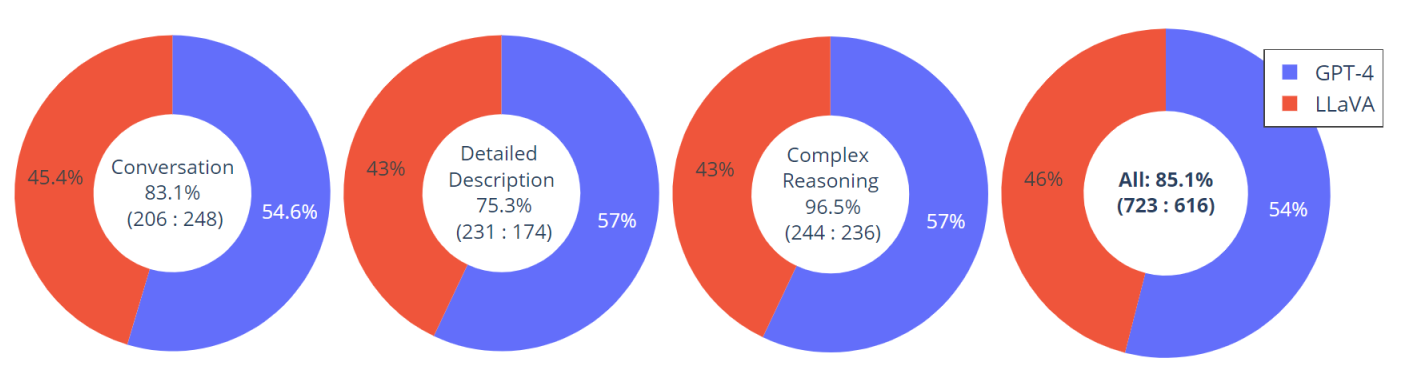
3. Using Llava
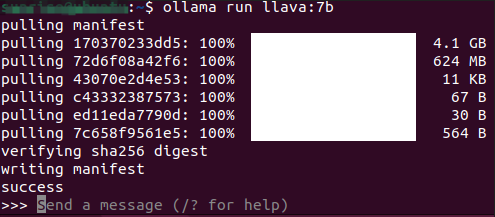
3.1 Running Llava
Use the run command to start running the model. If the model has not been downloaded, it will automatically pull the model from the Ollama model library:
ollama run llava:7b
3.2 Starting a Conversation
How many minutes is half an hour?
Response time depends on your hardware configuration. Please be patient!

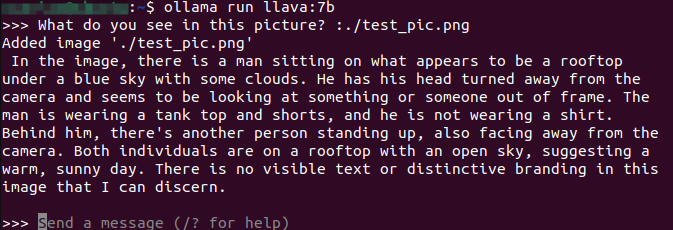
3.3 Visual Function

What do you see in this picture? :./test_pic.png
#Use ": + image path" in the conversation to enable the model to use its visual function and interpret the information in the image.
3.4 Ending the Conversation
Use the Ctrl+d shortcut or /bye to end the conversation!
References
Ollama
Official Website: https://ollama.com/
GitHub: https://github.com/ollama/ollama
Llava
Ollama Model: https://ollama.com/library/llava